Lawn & Landscaping
Choose lawn size and difficulty; add trimming, leaf bags and custom charges.
YOUR WORK. YOUR RECORDS. ONE PLACE.
Keep track of who you’ve quoted, who you’ve invoiced and who’s paid. Put customer records, jobs and manual expenses alongside your quotes.
One plan. $12.99 USD/month.
Start 7-day free trialCard required. Stripe handles checkout. SmartQT does not store your full card number. Cancel in Manage Billing before your trial ends to avoid the first charge.
See how SmartQT works — no signup required →7 days free for first-time SmartQT subscribers. Card required. Then $12.99 USD/month, renewing automatically until canceled. Cancel in Manage Billing before your trial ends to avoid the first charge.
Cancel anytime from your account’s Subscription & billing → Manage Billing / Cancel. Subscription checkout is handled by Stripe; SmartQT does not collect or store your full card number.
YOUR BUSINESS, YOUR WAY
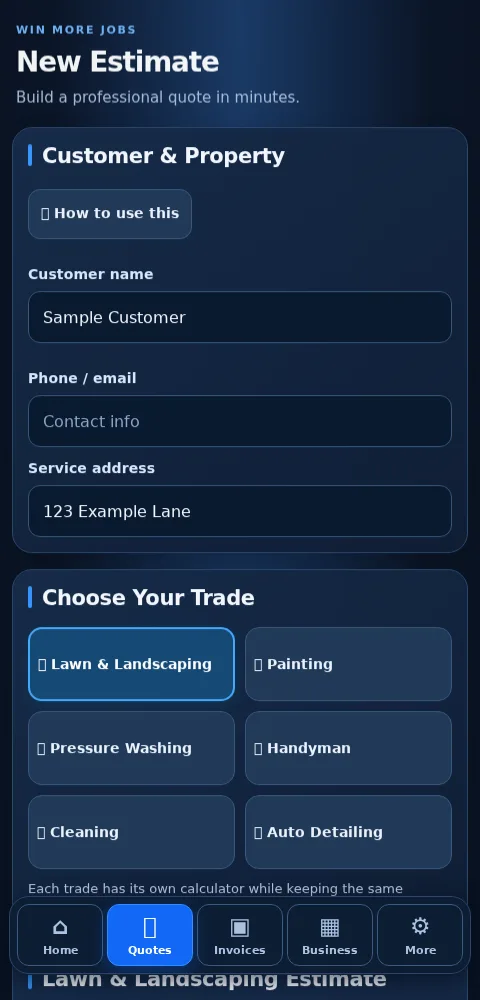
For small-business owners working on their own: quote a catering order, price a bakery delivery, invoice consulting hours or plan the next service job. Any Business lets you enter your own items, quantities and prices.
Work in a trade? These six optional calculators help you work out a starting price. Review every estimate against the actual job.
Choose lawn size and difficulty; add trimming, leaf bags and custom charges.
Enter wall length, height, doors, windows and coats; review paint, labor and supplies.
Enter square footage, your rate, surface, materials and minimum service charge.
Enter labor hours, your hourly rate, materials and a trip charge.
Enter square footage, your rate, bathrooms, deep-clean charges and supplies.
Choose vehicle size, package, condition and optional add-ons.
Restaurants can use quotes for catering, customer invoices and manual expenses. SmartQT is not a point-of-sale register, kitchen ordering or inventory system. The calculators use the details you enter; they do not measure a property or a wall from photos.
LESS PAPERWORK AFTER WORK
Reopen saved estimates and invoices, record payments you received, and see unpaid invoices. Keep the next job’s date and customer details together.
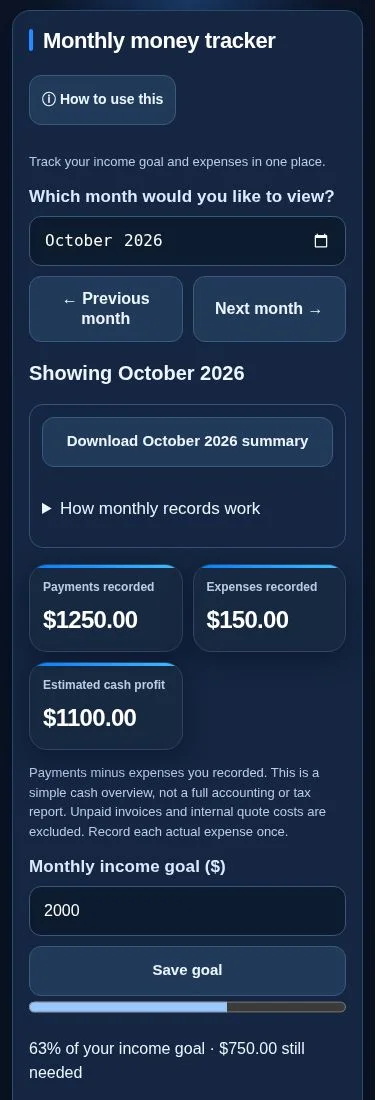
Choose a month, set an income goal and enter actual expenses. Review payments recorded, expenses recorded and estimated cash profit. Look back at past months and download CSV records for your accountant.
The totals reflect records you enter and update. They are not a bank balance or an accounting or tax report.
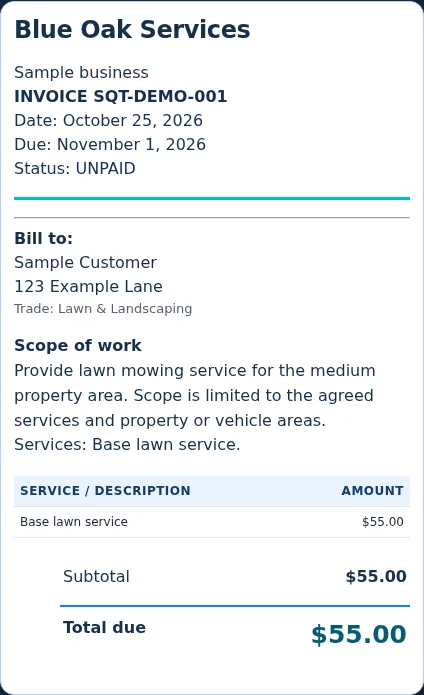
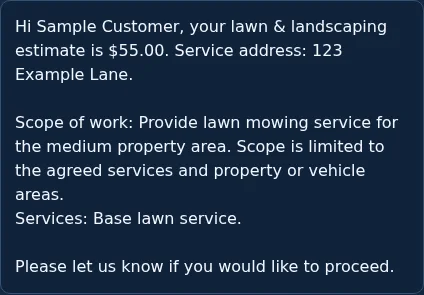
Send a clear quote with your logo, scope of work and price, so customers can see exactly what they’re agreeing to.
Build a quote using your own prices or an optional trade calculator. Review it, save it, then turn it into an invoice.
SMARTQT ALL ACCESS
7 days free for first-time subscribers. Card required; then renews monthly until canceled.
For comparison, Jobber Core’s standard month-to-month price is $49/month before temporary offers. SmartQT offers a narrower set of tools. Compare the features and billing options →
Quotes, invoices and a simple money overview in the same account, instead of keeping separate quote documents and payment spreadsheets.
Card required. Cancel yourself in Manage Billing before the trial ends to avoid the first charge.
7 days free for first-time SmartQT subscribers. Card required. Then $12.99 USD/month, renewing automatically until canceled. Cancel in Manage Billing before your trial ends to avoid the first charge.
Cancel anytime from your account’s Subscription & billing → Manage Billing / Cancel. Subscription checkout is handled by Stripe; SmartQT does not collect or store your full card number.
BUILT FROM SMALL-BUSINESS EXPERIENCE

I was born in Texas and raised in California. I started at the bottom, working in several trades alongside hardworking people. Over the years, I worked my way into supervisor and management roles, and eventually owned my own business.
SmartQT started as an idea: small-business owners should be able to organize their work without spending a fortune on apps. From running a lawn and landscaping business, I know the work doesn’t end when the tools are packed away. There are still quotes, invoices and expenses to keep up with.
I built SmartQT to keep those everyday records together at an affordable, clear monthly price. My goal is to give people useful tools they can understand and use, whether they’re just starting out or have been running a business for years.
Why I built SmartQT & how to reach me →SmartQT is for owners managing their own work. If you need a dispatcher, multiple staff logins or a complete accounting department’s tools, it is not the right fit for those needs.
First-time SmartQT subscribers get seven days free. If this account has had a SmartQT subscription or trial before, it does not receive another trial. Creating a free account alone does not start the trial; it starts when you finish subscription checkout.
Create an account with your email and password, confirm your email, then choose Start 7-Day Free Trial and finish Stripe checkout. The checkout shows when the trial ends and the first payment is due.
Cancel anytime from your account’s Subscription & billing → Manage Billing / Cancel. Subscription checkout is handled by Stripe; SmartQT does not collect or store your full card number. Cancel before the trial ends to avoid the first subscription charge.
Yes. Open the public app preview to see sample estimates and an invoice. The sample customer details are fictional and do not change your records.
No. Add your payment instructions, such as cash, check, Zelle or Cash App. Receive payment separately, then mark the invoice paid. This records the payment; it does not charge the customer.
No. The money tracker shows paid invoices minus expenses you enter, monthly income goals and CSV downloads. It is not full accounting, bank reconciliation, payroll or tax preparation. Keep your source records and use an accountant or accounting software when needed.
No. Leads and follow-up dates are records you manage yourself. Jobs are a dated work list, without automatic texts, calendar sync, crew dispatch or conflict checking.
SmartQT is a web app you open in your phone’s browser. You can also use it on a computer. No app-store download is required.

Enter a new password after opening the reset link in your email.
YOUR BUSINESS
Everything you need. One place.
Track your income goal and expenses in one place.
Payments minus expenses you recorded. This is a simple cash overview, not a full accounting or tax report. Unpaid invoices and internal quote costs are excluded. Record each actual expense once.
Expenses and goals save to your signed-in cloud account. Bank connections are not included.