Estimates & invoices
Create and save quotes, convert accepted estimates into invoices, and print invoices or save as PDF.
See the tools before signing up. These examples use fictional customer details and do not save anything to your account.
Enter the customer and job details. Choose a trade calculator or enter your own price, then review your estimate.
Actual SmartQT screen · sample data
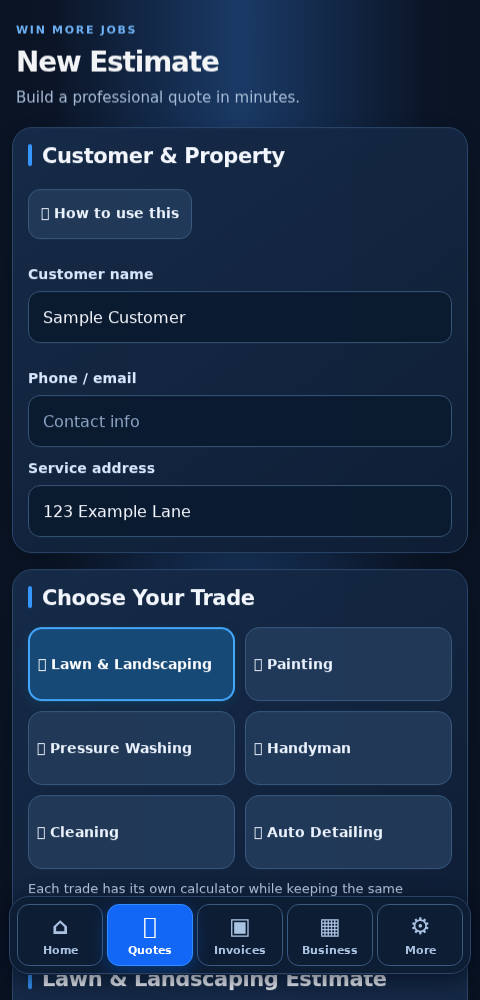
Quote a catering event, price a bakery order, invoice consulting hours, or estimate a cleaning job. Start with Any Business and enter your own products or services.
For restaurants, SmartQT supports catering quotes, customer records, invoices and manual expenses. It is not a register, kitchen ordering or inventory system.
Create and save quotes, convert accepted estimates into invoices, and print invoices or save as PDF.
Find customer history, record inquiries and choose follow-up dates. Follow-ups are managed manually.
Keep upcoming jobs, addresses, dates and completion status together.
Record payments and expenses, set an income goal and review estimated cash profit.
Export records for compatible spreadsheet apps. SmartQT does not include a spreadsheet editor.
Add business details, a logo and payment instructions to help customers recognize your documents.
Sample invoice • SQT-DEMO-001
Bill to: Sample Customer
123 Example Lane
Mow, edge and trim the agreed lawn area. Includes cleanup.
Payment instructions: Please contact the business to arrange payment.
Sample only. Marking an invoice paid records a payment received separately; it does not charge a customer. The money tracker is a simple cash overview, not full accounting, payroll, tax preparation or a bank connection.
First-time SmartQT subscribers get 7 days free. An account with a previous SmartQT subscription or trial does not receive another trial. A payment method is required. Renews at $12.99/month until canceled. Cancel in Manage Billing before the trial ends to avoid the first charge.
Start 7-day free trial